



This post contains my referral link, which help to support Kosher on a Budget. For more information, see my disclosure policy.

I’ve talked before about what a sink fund is – and how it helps to stretch our budget. Today I want to explain specifically how, where and why we keep our sink funds for maximum money-saving.
When I started to investigate where to “keep” our sink funds (assuming that under the mattress wasn’t a great idea), I knew there were several characteristics I was looking for in a savings account.
1. An account that would be separate from our main checking account. Some people successfully keep all their money in the same account and have the self-discipline not to dip into money that isn’t allocated. I, however, didn’t trust us that much. Keeping the money separate is visually and practically important to me.
2. An account that would allow me to have sub-accounts. I didn’t want to have to set up a dozen different accounts. That would have been way too much virtual paperwork to stay on top of. I wanted one account with partitions between my money – so I could shut off my Emergency Fund money from the Home Sink Fund money. (Again, getting back to #1 – separation is good for us!)
3. I wanted to earn a bit of interest, but “making money” on my Sink Funds was NOT a priority. Sink Funds are money with an intended and immediately foreseeable purpose. Making money through investments requires risk. I was not willing to risk our Sink Funds.
When I added 1 + 2 + 3, I ended up back at Capital One 360.
Yup, the same online bank that we use for our “virtual envelopes” checking account. Here’s why Capital One 360 made the most sense for us:
1. Capital One 360 is not where we have our primary checking and business checking accounts – those are at a local brick & mortar bank. So, it’s separate from the rest of our everyday money.
2. Capital One 360 allows you to set up sub accounts (which I’ll talk you thru below), so my home maintenance funds aren’t co-mingling with my car repair funds.
3. Capital One 360 pays interest – a very paltry .85% right now (weep). But again, I’m not out to make money. I’m out to hold my money safely, until I need it – which will, no doubt, be within a few months at the most.
How to Set up Sub-Accounts at Capital One 360
When you first sign up for a Capital One 360 savings account, you will need to do a little bit of paperwork. To verify that you are who you say you are, Capital One 360 will need you to authorize a transfer from an outside bank account.
You will also get assigned a Saver ID. This ID is a 9-digit number, which applies to your entire Capital One 360 portfolio – savings, checking, kids’ accounts if you want to set them up, Retirement Accounts, etc.
I set up our account so that both DH and I have access to it. He has his own Saver ID, but both IDs are able to access the portfolio.
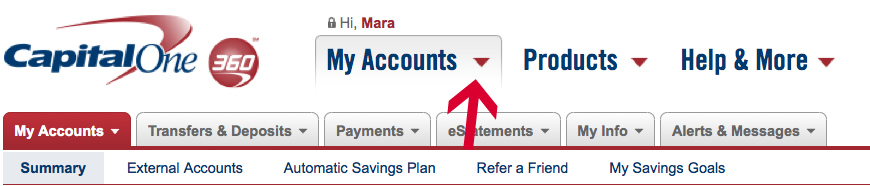
When you are ready to start creating sub-accounts, you just log in to Capital One 360 with your Saver ID (and password and security questions), then click on the My Accounts pull-down menu and select Open Account.
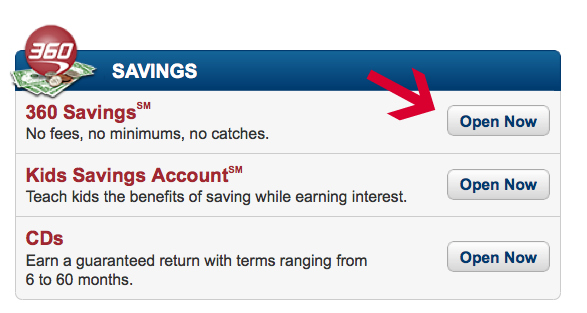
You want to open a 360 Savings Account, which is the first option on the top right under Savings.
Under “How Do You Want to Set Up Your Account”, I always click on Joint, so that both my husband and I have access. I actually manage all of our Capital One 360 accounts, but if G-d forbid something should happen to me, I want my husband to have seamless access to our accounts.
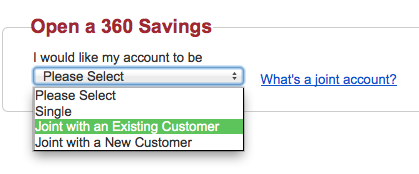
To make it a Joint sub-account, I just have to enter his Saver ID and password.
If for some reason we wanted to, one of us could create an individual sub-account, which the other would be able to see, but not deposit or withdrawal funds from.
When creating your sub-savings accounts, you get to choose a name for each one. I have creatively named them things like “Property Taxes Sink Fund” and “Car Sink Fund”.
You need to fund your new sub-account, either with a deposit from another sub-account, or from an outside bank. There is no minimum balance – so you can open a sub-account with just $1.
Later, when you want to transfer money into one of your savings account, you will be prompted to select which sub-account you want the deposit credited to.
Once you finish creating the sub-account, it automatically shows up on your Capital One 360 dashboard. You will be able to see all of your accounts on one page – with their subtotals, and then the grand total at the bottom.
I love being able to see all my accounts in one place – and knowing exactly where each one stands – without having to toggle between screens and accounts. I love that my funds are divided, but I don’t have to hassle with a ton of extra paperwork.
Our Sub-Accounts
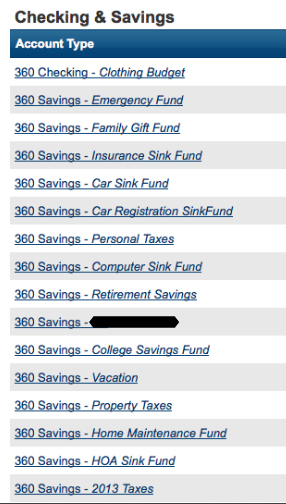
(If you’re wondering what I blocked out, it’s my daughter’s name.)
For those of you who are curious, here is a list of the many different sub-accounts that we have at Capital One 360. These have evolved over time and are the ones that work for our family needs (i.e. if you do this, you will probably find that you have different needs and therefore different sub-accounts).
- Family Gift Fund – which I explained HERE
- Insurance Sink Fund (car, life, home owners and disability – combined) – which I described HERE
- Car Maintenance, Repair & Replacement Fund – which I talked about HERE
- Home Repairs & Improvement Fund – which I explained HERE
- Auto Registration Fund – Our annual license & registration fee divided by 12
- Accountant Fund – Our average bill to the accountant for year-end and quarterly taxes, divided by 12
- Computer Fund – $30 per month, to go toward replacing hardware, updating software, etc. Since we both work for ourselves and are on our computers all day long, a dead computer would be a bonafide “emergency”.
- Property Tax Fund – Since the bank doesn’t escrow our taxes, we do it ourselves. Our property value has gone up each year, which means we need to readjust the amount every time we get a new assessment. When our annual tax bill comes, we just transfer the money into our checking account and make a payment.
- Camp Fund – We roughly calculate the cost of summer camp (day camp for now, though that may become overnight camp in the future) divided by 12. We have this amount monthly, so when the camp bill comes due, we aren’t scrambling.
- Vacation Fund – This sub-account unfortunately doesn’t get funded monthly (not enough money in the budget), but whenever we have a windfall, this is one of the two places it goes.
- Kids’ “Future Events” Fund – This is the other place a windfall goes. Right now, this fund is a sort of catch-all for Bar & Bat Mitzvahs, college, weddings…. we need to define this better, but for now, it’s a small fund that we add to when we can.
Although we don’t do this, I have friends who set up Sink Funds for the holidays. Rather than having to cash flow the added expenses associated with food, gifts and other items during those holidays, they save a set amount 12 times a year to draw from for their budgeting in those more expensive months.
Do sub-accounts make sense for your money-management style? Is there a different way you like to set aside money for future expenses?
(This post originally appeared in December of 2011. We are still going strong with our sink funds at Capital One, so I wanted to reshare this information for anyone who is looking to get organized with their budgeting.)


So this is part of the groceries account, but these are savings? They will not be able to be used with the debit card, correct?
These are separate savings account. They are held at the same bank (ING) as the debit card grocery account, but they are savings, which can’t be accessed by the debit card. HTH. Let me know if you have other questions.
Wow- great post! We don’t have sub-accounts like this, just a checking, savings and brokerage account. I’d also like to open a joint retirement account. Aside from saving in your sink-fund, do you put away money for retirement?
We do put aside for our retirement. And eventually that “kids future events fund” will have college funds split off, G-d willing. And we have our Emergency Fund (which is actually another sub-account at ING.) HTH!
Looks like a great system, I think I want to sign up. We just started to have virtual sink funds (this is our 2 nd month with written budget), but they are all in our bank, I just them designated and not touched. But ING looks much neater and pretty convenient. Thanks!
Yay – you guys are doing great with our budget. If you have the power not to touch them, then it’s totally fine to keep them comingled. I *needed* them separated.
This is just our 2nd month, so I wouldn’t be so optimistic:) We haven’t quite gotten hit yet with me leaving job to stay home with my daughter. That’s why I want to physically separate the $ before it’s too late:)) Thanks for all your wonderful advise!
i agree that ing is the best for something like this. i’m not as detailed as you (yet) but each of my kids have an account that starts before they’re born. first it’s a ‘baby’ fund for purchases and to cover our expenses when i’m on maternity leave and then whatever’s left they get to ‘keep’ in their account and we add gifts they recieve and put away money every month. i also use it whenever i get money that doesn’t ‘belong to me’ ex: someone gave me money to give to someone else, someone backed into my car and gave us money for repairs. it’s money that is set aside for something specific. it needs to be out of my main account so it doesn’t get spent. ing makes things very easy.
Thank you. This is exactly what we need–we keep setting money aside for planned expenses, but then we spend it on something before that bill actually come in. I didn’t get how to do the envelope system for annual expenses, but this is it. Thank you.
Thank you. This is exactly what we need–we keep setting money aside for planned expenses, but then we spend it on something before that bill actually come in. I didn’t get how to do the envelope system for annual expenses, but this is it. Thank you.
I think it would be interesting to do this for expenses like shul dues, depositing tzedaka money for later distribution, school expenses, etc.
Kate – we actually do that, too! Not shul dues (those we just pay monthly), but summer camp has a sink fund. And we have done tzedakah that way in the past, since I find that it really helps us give a bigger, more intentional donation.
We actually just got a separate check book for the tzedaka acct Bec was getting stressful w transfers to our main checking acct
hey just read this post and love the idea i was just wondering if you have to put the money into the sub accounts manually or is there a way to set it up automatically (in case im not as disciplined) … thanks
Yes, you can definitely do it automatically. Most of ours are transferred automatically on the 1st of the month (you can pick your day, though, if the 1st doesn’t work for you.
wow thanks for you quick reply, i have a BOA account now do you know if they also have this option? and if not i am assuming you did your research and know that Capital one is the best option,
do you mind if i start looking into it and then you questions along the way if i have any.. (i was always looking for something like this – i was hopping though to get some interest along the way),
also is there long term savings with bigger intrests (that take monthly) for like kids weddings etc.?
This is great, thanks for sharing!
The funds in the savings account would need to be transferred to another bank account. You have to “link” accounts when you set it up and can then just wire the transfers that way.
Isn’t there a fee to do a wire transfer?
Sorry I didn’t see/answer this question right away. Nope, there is no fee to transfer the money — it’s actually an ACH transfer and they are free 🙂
This is really helpful so thank you for sharing. The only thing I’m a little confused about is how do you get the money out of the right sub-account to pay certain bills? For example, if you pay for an oil change with the debit card, how is it determined that the money for that will be taken from the sub account intended for expenses related to car upkeep?
Good question, Dee! So here’s what I do — if I get an oil change, for example, I pay for it however I would normally (credit card, debit card, etc.) Then I get home and later that night or the next day, I go to Capital One and order a transfer from my “car upkeep” fund to my bank account in the amount of the oil change. In reality, I do this once a month, when I’m reconciling all my different accounts, since I have enough money in my bank account to ‘float’ those additional charges.
Hope that makes sense!
This is a really good idea! How often do you deposit to these accounts?
Every month! I divide the expense into monthly amounts and each month, I deposit that amount!